Sourcing LinkedIn LinkedIn Recruiter CV database Duplicates Ada

Source without stacking up tools

LinkedIn, CV databases and job boards, one talent pool,
with no duplicates and no re-entry.

Talk to an expert
Free 14-day trial, no credit card
Your sourcing channels
LinkedIn
LinkedIn Recruiter
Nicoka CV database
130+ job boards
Career site
Employee referrals
Plugin across 10 CV databases
one single talent pool at the end
LinkedIn
CV database
Job boards
Import and de-duplication
One single talent pool
Enriched profiles - Skills - History - Consent
Getting in touch
RoleAdded in one click
ApproachEmail - SMS - LinkedIn
ProcessStages and tracking
The principle

Search everywhere, file it all in one place

A recruiter spends the day moving between LinkedIn, their CV database, their job boards and a spreadsheet. The same profile exists in there three times, nobody knows who has already contacted them, and the history gets lost.

In Nicoka CABS, all of those channels feed one talent pool. A profile sourced on LinkedIn joins the database, its duplicates are flagged on import, its skills are extracted, and it is added to the role with no re-entry.

  • Built-in LinkedIn sourcing, including through LinkedIn Recruiter: you filter, you analyse, you add to the role.
  • Duplicates flagged on import : profiles already in your database are pointed out before you recreate them.
  • Ada searches your own talent pool : describe the profile, and it suggests candidates and explains why.
How it works

Four moves, from spotted profile to engaged candidate

Sourcing happens inside the tool where your recruitment already lives, not next to it.

1

Search

On LinkedIn and 10 CV databases through the plugin, in your own talent pool, or with a sentence in plain language. Keywords, location, skills, connection degree.

2

Analyse, or ask Ada

Ada reads the profile, weighs it against the role, gives a score and lists the strengths as well as the reservations.

3

Add to the role

One click: the profile joins the talent pool and the assignment. Candidates already in the database are flagged, with no duplicate created.

4

Engage

Message, multichannel sequence or call: the exchange is recorded in the file, visible to the whole team.

Stages 01 and 03

Source on LinkedIn without leaving Nicoka CABS

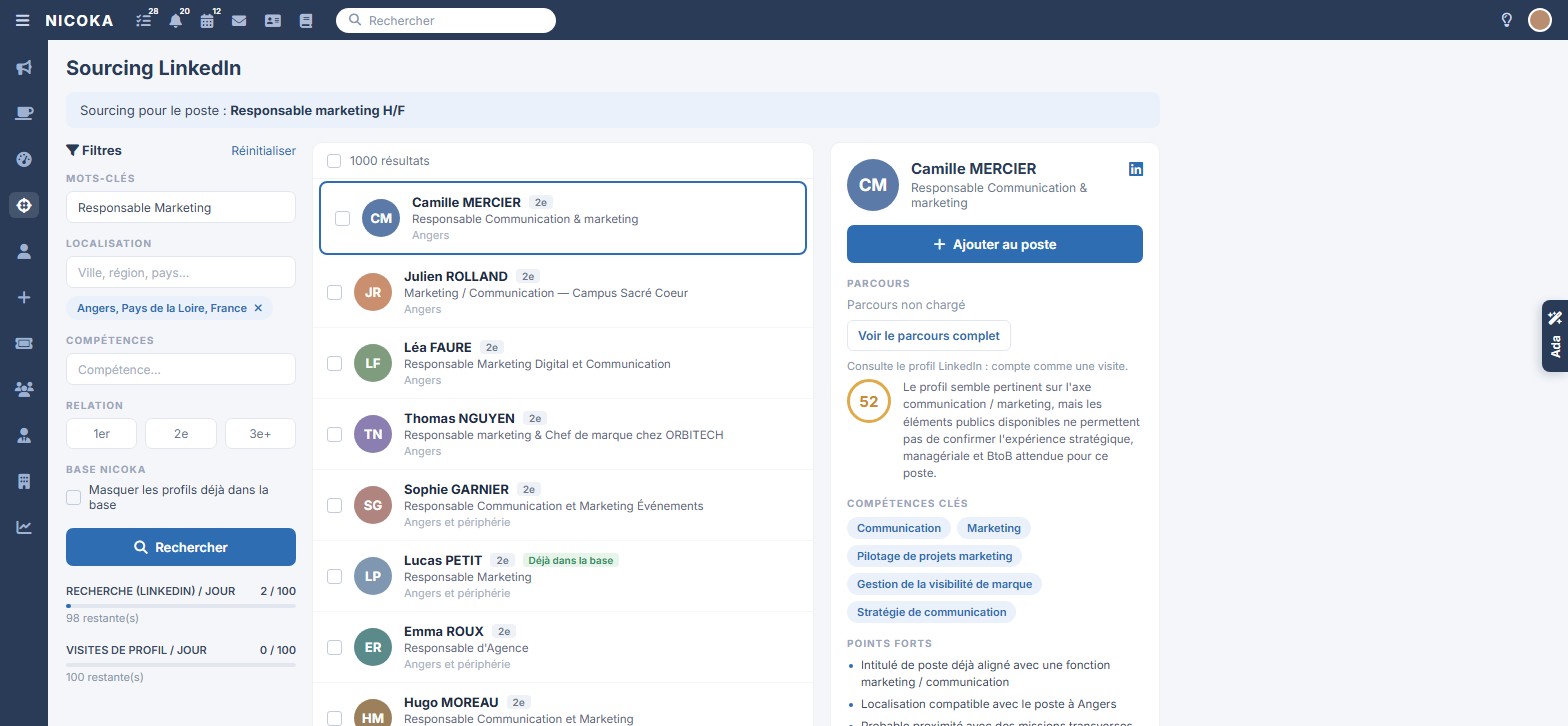
You search from the sourcing screen, attached to the open role: keywords, location, skills, connection degree. Profiles already in your database are flagged, and one click is enough to add a candidate to the assignment.

  • LinkedIn and LinkedIn Recruiter : sourcing from the role, and a linked Recruiter project for automatic import.
  • Already in the database : the badge stops you recreating a candidate you already track.
  • Quotas in plain sight : searches and profile views remaining, shown openly.
  • Profile analysis : Ada sums up how relevant the profile is for the role, reservations included.
Explore the Nicoka plugin
LinkedIn sourcing screen in Nicoka CABS: filters, results, Already in the database badge and profile analysis

LinkedIn sourcing in Nicoka CABS. Fictional data.

Stage 02

Your best talent pool is often your own

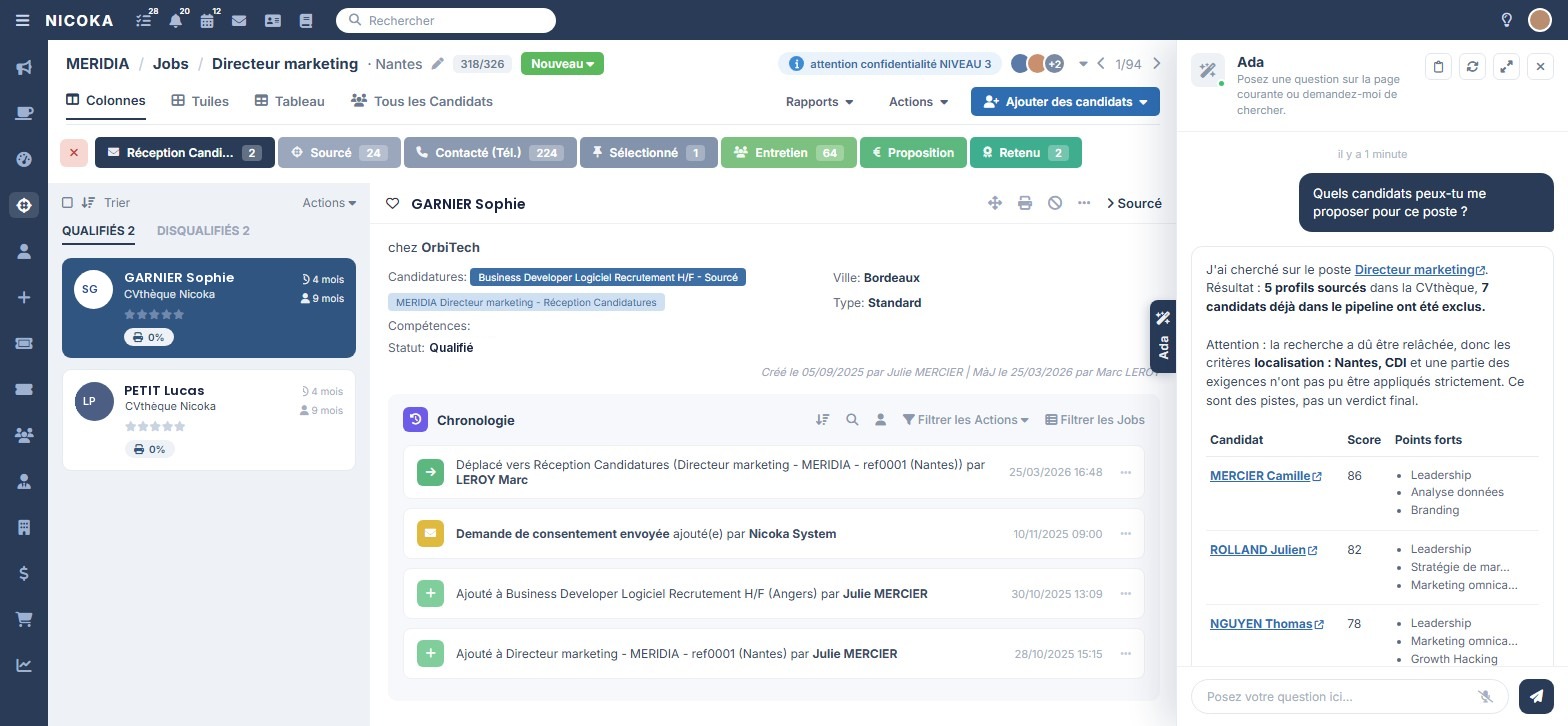
Before looking outside, ask Ada what your database already holds. It queries the CV database from the role, sets aside candidates already engaged in the pipeline, and explains which criteria it relaxed.

  • Natural-language search : describe the profile as you would to a colleague, and Ada handles the criteria.
  • Score and strengths : every suggestion is justified, and you keep the decision.
  • Candidates already in the pipeline excluded : no double approach on the same assignment.
  • Advanced search engine : skills, experience, location, availability, tags.
See candidate search
Ada suggests candidates from the CV database for a role, with their score and their strengths

Candidate search assisted by Ada. Fictional data.

Two ways to source

The plugin across all your CV databases, LinkedIn straight inside Nicoka

Whether you start from a profile found on a job site or from a role open in Nicoka CABS, the candidate ends up in the same place.

Nicoka plugin

Source across 10 CV databases without leaving your browser

On a profile page, the Nicoka button pulls the details in, you check them, you confirm. The candidate or the contact is created in Nicoka CABS, attached to a role, with their tags and your notes.

LinkedIn, Recruiter and Sales NavigatorHelloWorkCVadenApecFrance TravailTurnover-ITIndeedMeteoJobAgefiphPappers
  • Profile already known : the plugin shows their Nicoka record instead of creating a second one.
  • Candidates and contacts : you feed your CRM from LinkedIn too.
  • Chrome and Edge, an extension developed in France.
Explore the Nicoka plugin
LinkedIn and LinkedIn Recruiter

Source from Nicoka, and link up your Recruiter projects

The LinkedIn sourcing screen lives inside Nicoka CABS, attached to the role: you filter, you analyse, you add. And if you work in LinkedIn Recruiter, you link the project to the role once and for all.

Built-in sourcingLinked Recruiter projectsAutomatic importSynchronised conversations
  • Project linked to the role : candidates added to the LinkedIn Recruiter project arrive automatically in the Nicoka role.
  • Sourcing without switching tools : filters, quotas and profile analysis in the same window.
  • LinkedIn conversations brought back into the candidate record.
See LinkedIn sourcing in a demonstration
What built-in sourcing gives you

A talent pool that builds itself while you work

Every profile you approach enriches the database instead of vanishing into a spreadsheet.

All your sources in one place

LinkedIn sourcing, the plugin on your CV databases, job boards, career site and employee referrals all feed the same talent pool, with no trade-off to make between channels.

  • 10 CV databases covered by the plugin
  • 130+ job boards for multiposting
  • One single talent pool at the end

A database without duplicates

The same candidate met across three channels stays one record, with all their history and exchanges.

  • Detection of profiles already in the database
  • History and exchanges consolidated
  • Automatic CV analysis

An AI that explains its choices

Ada suggests candidates, gives a score and sets out the strengths as well as the reservations. You confirm with full knowledge of the case.

  • Natural-language search
  • Score and strengths per profile
  • Relaxed criteria flagged

The approach follows straight away

A sourced profile can be contacted immediately, by email, SMS or sequence, with your own message templates.

  • Multichannel inbox
  • Automated sequences
  • Exchanges recorded in the file

A talent pool that stays usable over time

The profiles you set aside today stay qualified for tomorrow: skills, tags, availability and history are all kept.

  • CV database enriched and tagged
  • Advanced search engine
  • Reactivation on a new assignment

Compliant sourcing

Consent, retention periods and the right to be forgotten are handled in the tool, including on sourced profiles.

  • Consent requests recorded
  • CV anonymisation
  • Data hosted in France
They already source with Nicoka

A tool proven by agencies, IT services firms and independent recruiters

+200

clients

Agencies, IT services firms, staffing agencies and HR departments source their candidates in Nicoka CABS.

30 000+

users

Consultants and researchers work on the same talent pool, without doubling up on each other.

130+

partner job boards

Active sourcing is rounded out by wide publication, with applications coming back to the same place.

Frequently asked questions

What we get asked about candidate sourcing

Can we source through LinkedIn Recruiter?
Yes, in two ways. The Nicoka plugin imports a profile from LinkedIn, LinkedIn Recruiter or Sales Navigator, straight into the role. And you can link a Nicoka role to a LinkedIn Recruiter project: candidates added to the project are then imported automatically into that role.
How are duplicates handled?
On import, Nicoka CABS spots profiles already in your database and flags them before creation. The candidate keeps a single record, with their history and their exchanges.
Does the AI replace the researcher's work?
No. Ada prepares the work: it queries the CV database, suggests profiles with a score and strengths, and flags the criteria it had to relax. Selection and approach remain yours.
What happens to profiles sourced but not shortlisted?
They join your talent pool, qualified and tagged, with their skills extracted from the CV. You find them again on a future assignment through advanced or natural-language search.
Is sourcing GDPR compliant?
Consent requests, retention periods, CV anonymisation and the right to be forgotten are handled in the tool, including for sourced profiles. Data is hosted in France.
Is sourcing sold on its own?
No. It is part of Nicoka CABS, which brings together the ATS, the CRM, sales and AI, at 130 euros per month per user. You can try it free for 14 days, with no credit card.

Candidate sourcing: search less, find better

Sourcing has become the core of the recruiter's trade. On most skilled roles, speculative applications are no longer enough: you have to go and find profiles who are not looking, approach them, win them over. The problem is not knowing where to look, everyone knows LinkedIn. The problem is what happens between the spotted profile and the engaged candidate.

What scattered sourcing costs

The scenario is a familiar one: a consultant spots a profile on LinkedIn, copies the name into a spreadsheet, sends a message, forgets to note the reply. Three months later a colleague approaches the same candidate, unaware they have already been contacted, or what had blocked it. Meanwhile the agency's CV database may well hold that profile already, sourced on an earlier assignment.

That scattering costs three things: search time done twice over, credibility with candidates approached twice, and the value of the talent pool you have built up, which stays unusable for want of qualification.

Source where the recruitment lives

The answer comes down to one principle: sourcing has to happen in the tool that already carries the roles, the applications and the exchanges. In Nicoka CABS, the sourcing screen is attached to the open role. You filter by keyword, location, skills and connection degree, you see immediately which profiles are already in your database, and you add a candidate to the assignment in one click.

The Nicoka plugin rounds this out across ten CV databases: LinkedIn, LinkedIn Recruiter and Sales Navigator, HelloWork, CVaden, Apec, France Travail, Turnover-IT, Indeed, MeteoJob, Agefiph and Pappers. On a profile page it creates the candidate or the contact in Nicoka CABS, or shows their record if they are already known. For teams working in LinkedIn Recruiter, a Nicoka role links to a Recruiter project: candidates added to the project are imported into the role automatically, with nothing to redo by hand.

Your internal talent pool, the first place to look

Before opening LinkedIn, the question to ask is a simple one: do I already have this profile? On a pool of several thousand candidates the answer is often yes, but you still have to find them. Candidate search combines an advanced engine (skills, experience, location, tags, availability) with a natural-language search: you describe the role, and Ada suggests the matching profiles, with a score and each one's strengths.

Ada also says what it set aside and which criteria it had to relax to offer any leads. These are reasoned suggestions, not a verdict: the decision stays with the recruiter, who keeps control of the qualification.

A talent pool that does not degrade

A talent pool is only worth anything if it stays clean. Duplicate detection on import prevents multiple records for the same candidate,automatic CV analysis extracts skills and experience, and the history of exchanges stays attached to the record, whichever consultant ran the approach.

On the compliance side, consent requests, retention periods,CV anonymisation and the right to be forgotten are handled in the tool. Sourcing does not create a parallel database outside your control.

From sourced profile to placed candidate

Sourcing is only the beginning. The approach follows straight away, by email, SMS or multichannel sequence, with your own message templates. The candidate then enters the recruitment process, moves stage by stage, is presented to the client through a secure link, then approved and invoiced. Finally, active sourcing is rounded out by wide publication: multiposting covers more than 130 partner job boards, and the applications received feed the same talent pool.

Nicoka CABS brings the ATS, the CRM, sales and AI together in one suite, at 130 euros per month per user, and supports more than 200 clients and 30,000 users across 30 countries.

What to take away

  • Sourcing from the ATS avoids double entry and keeps the history of your approaches.
  • Querying your own talent pool before looking outside saves hours per assignment.
  • Duplicate detection protects the quality of the database and your credibility with candidates.
  • A useful AI is one that justifies its suggestions and flags its limits.
  • Sourcing takes on its value when it is plugged into the recruitment process and into publication.

Go further: what sourcing means in recruitment, CV database, pricing.
Source your next profiles in a single tool

Our teams walk through LinkedIn sourcing, search assisted by Ada and the talent pool, on one of your open roles.

Free 14-day trial, no credit card