FR EN
Feature Client relationships Recruitment

Push Jobs & Push Candidates

Grow your business
by waking up your talent pool.

Built into Nicoka
Push Candidates Push Jobs

The right profile to the right client, the right job to the right candidate

Two complementary flows to get full value from your talent pool: put your candidates in front of your clients, and revive your pool with the roles you have open, straight from Nicoka.

Talk to an expert
CANDIDATES Sophie Martin Digital project manager AVAILABLE Thomas Rey Full stack developer AVAILABLE Laura Dubois Management accountant AVAILABLE Push Jobs & Candidates JOBS HR manager Altea Group Permanent • Paris Back-end dev. TechVision SAS Remote URGENT Accounts assistant Moreau & Co. Lyon

Business development

Put selected profiles in front of your clients and prospects to create new business without waiting for a brief.

Waking up your talent pool

Target dormant candidates and tell them about your current roles to keep the relationship alive and place faster.

Full traceability

Every send is recorded on the candidate record and the contact record: push history, attached documents and actions taken, all of it tracked.

GDPR compliance

Opt-out handling is built in: candidates who have declined marketing communications are excluded from send lists automatically.

How it works

Two complementary flows, the same logic in four steps.

Set up your candidate listing template

Decide what you want to share with your clients: skills, experience, availability. The Nicoka template anonymises by default, passing on only the candidate's system reference.

Settings > Modules > Recruitment > Candidates > List templates
Duplicate and adapt the template provided
Anonymisation built in by default
1
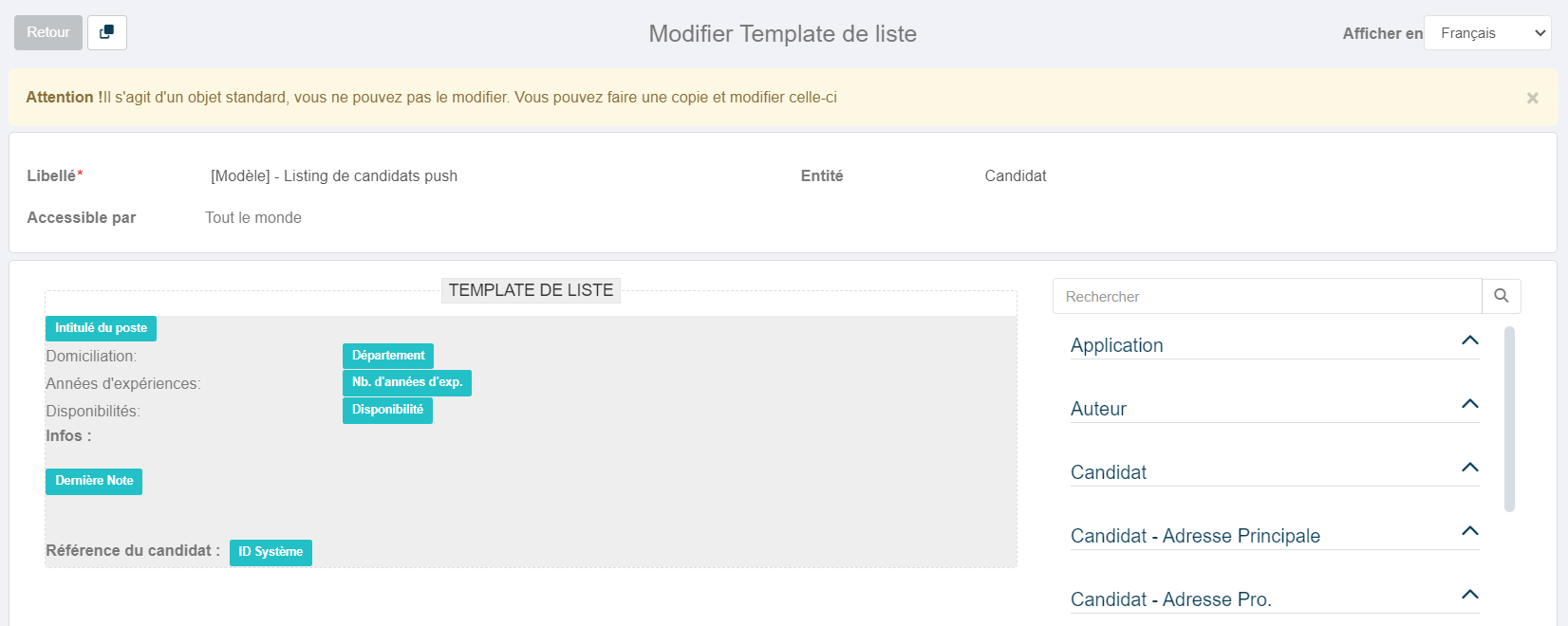
Candidate listing template, Nicoka CABS

Set up your email template and assign it

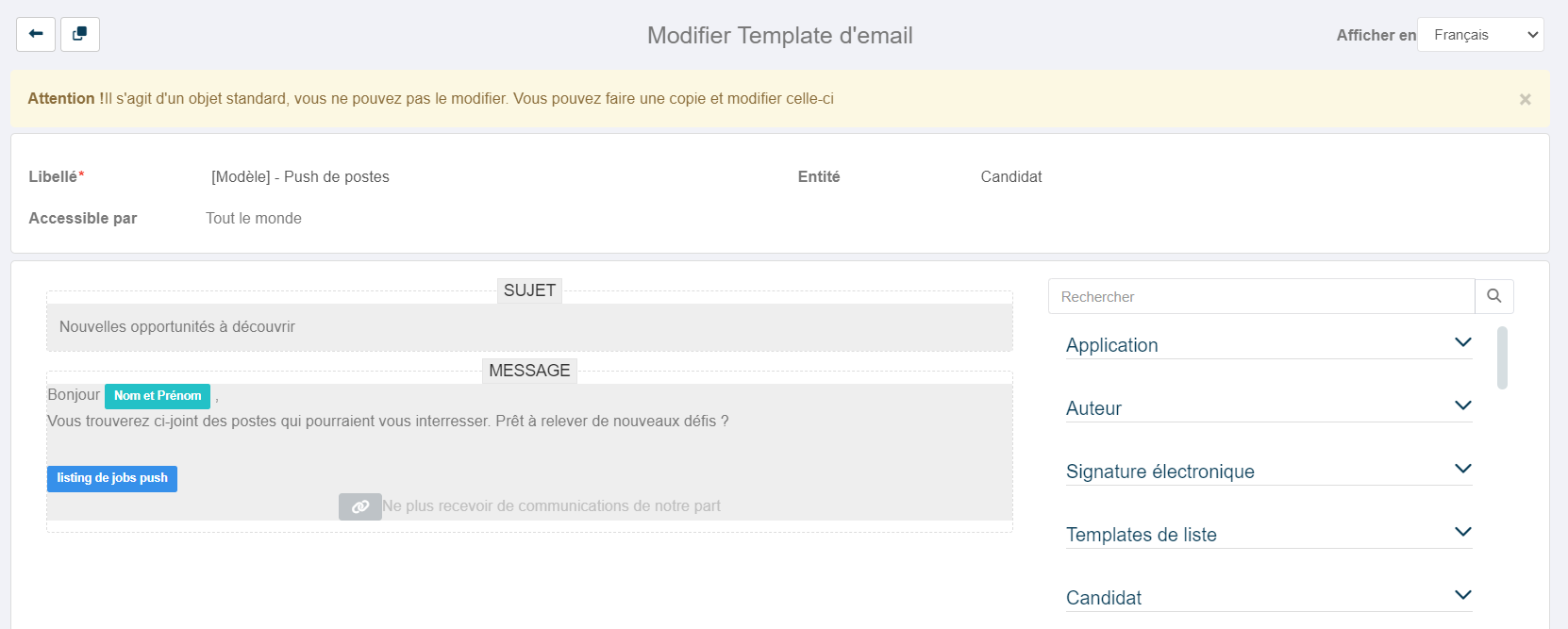
Adapt the wording of your covering email. The Nicoka template inserts your candidate listing automatically. Assign it from the Push settings.

An email template attached to the Contact entity
Candidate listing inserted into the body automatically
Signature placed at the end of the email automatically
2
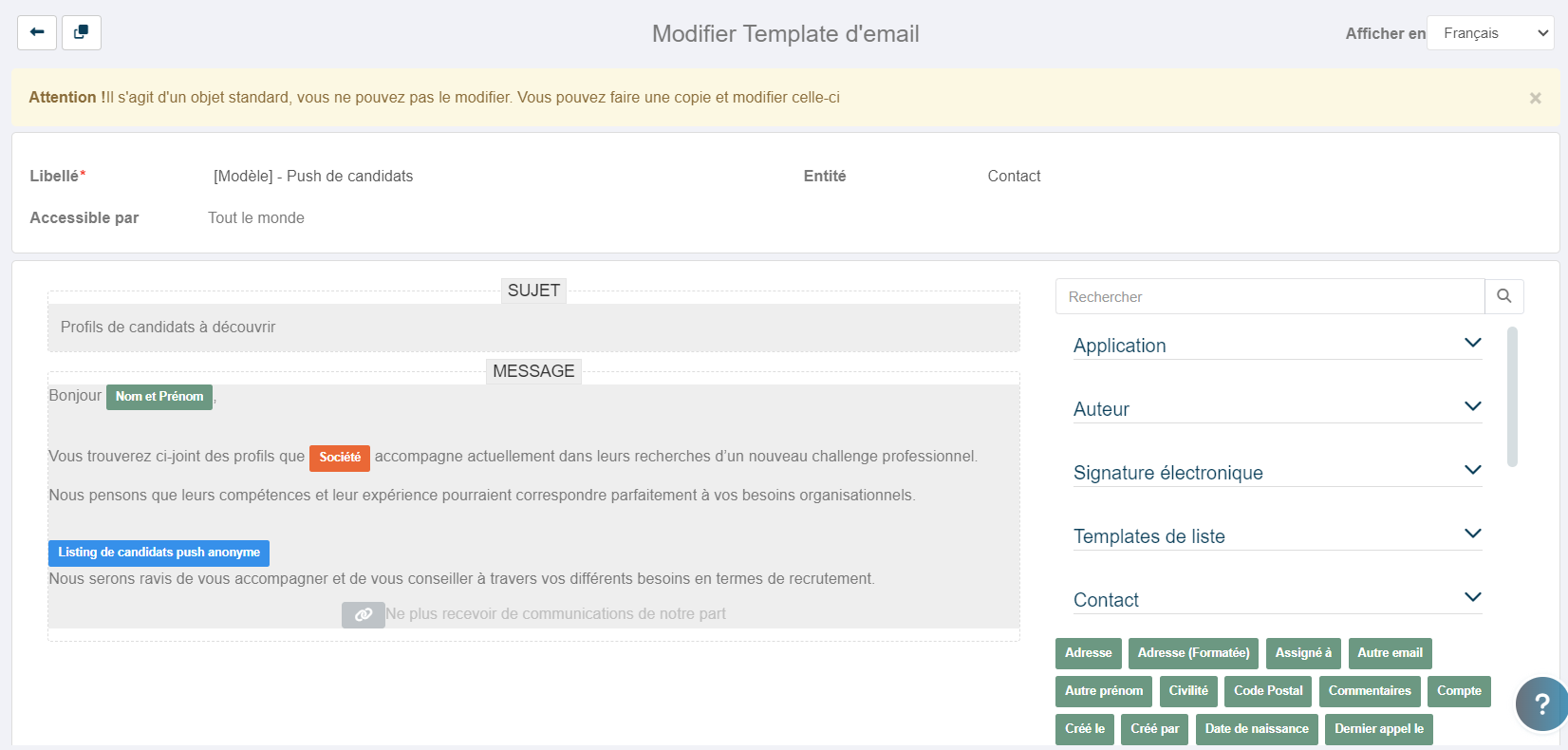
Push Candidates email template, Nicoka CABS

Select the contacts and candidates to push

From the My Contacts view, tick the clients and prospects you are targeting, then run the Push Candidates action. Enter the profiles to put forward and attach anonymised CVs if you want to.

Select by saved view or by hand
Up to 200 recipients per send
Optional attachments, with renaming options
3
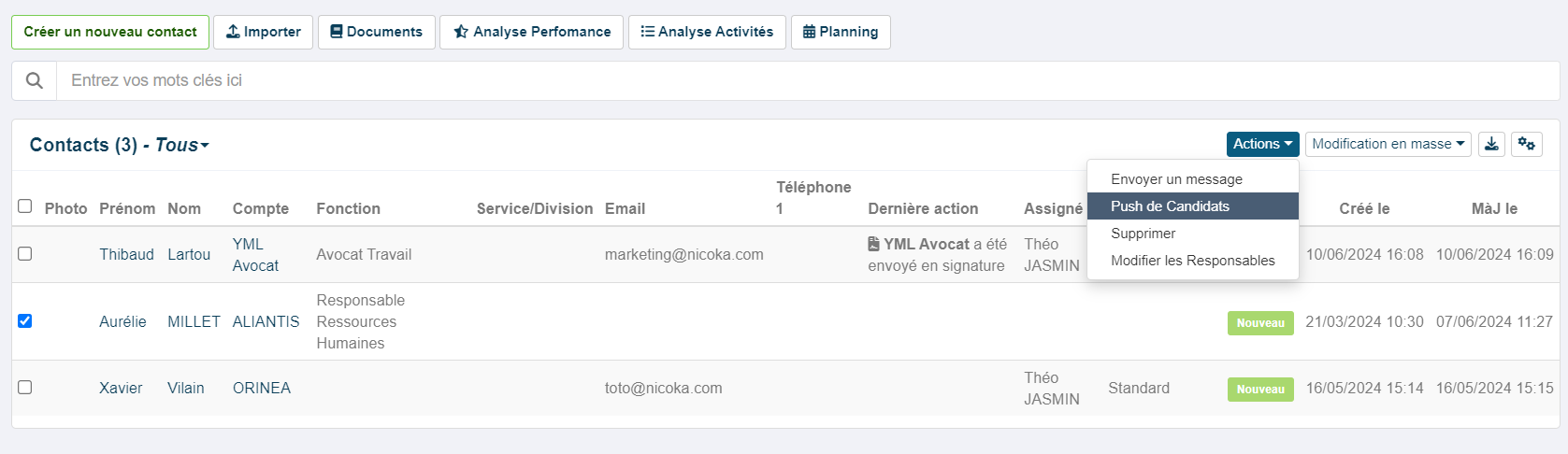
Selecting contacts for Push Candidates, Nicoka CABS

Preview, then send with confidence

Preview the final email before sending, check the blind-copied recipients, then send. Every action is tracked automatically on the candidate record and the contact record.

Automatic blind copy to protect confidentiality
Preview by email before sending
Send history tracked in Nicoka
4
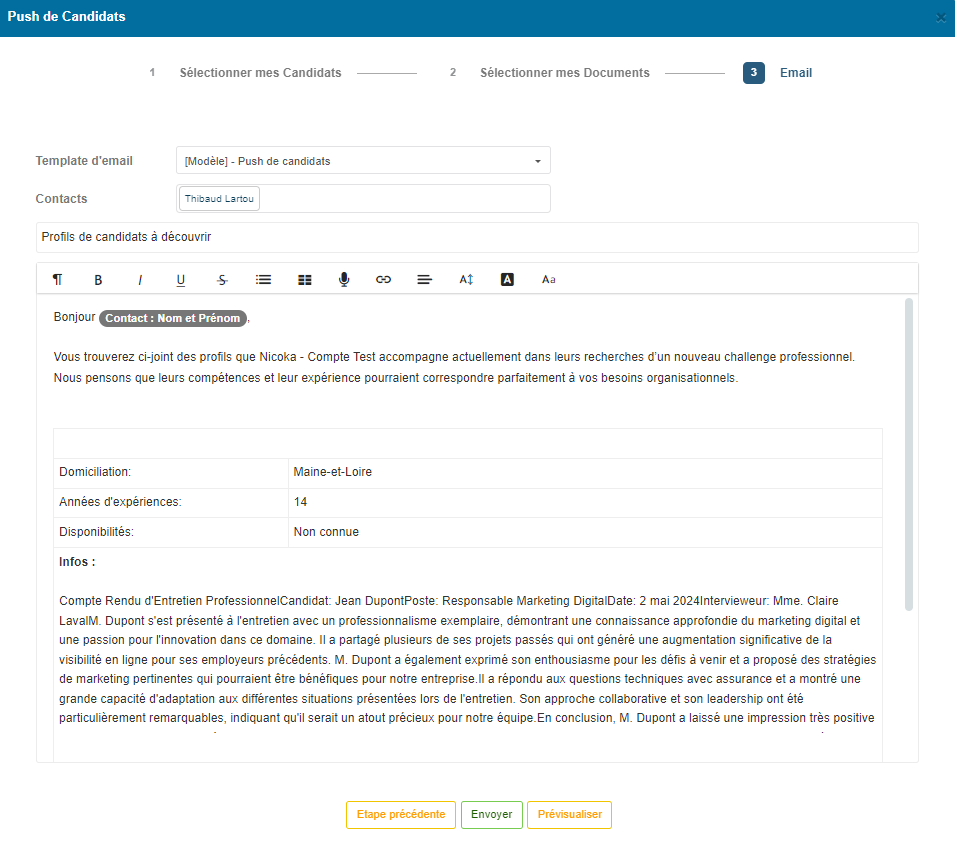
Sending a Push Candidates, Nicoka CABS

Set up your job listing template

Decide what to say about each role: job title, location, contract type, salary. The template Nicoka provides can be adapted by duplicating it.

Settings > Modules > Recruitment > Jobs > List templates
Add and remove fields to suit you
A clean layout that encourages applications
1
Job listing template, Nicoka CABS

Set up and assign your email template

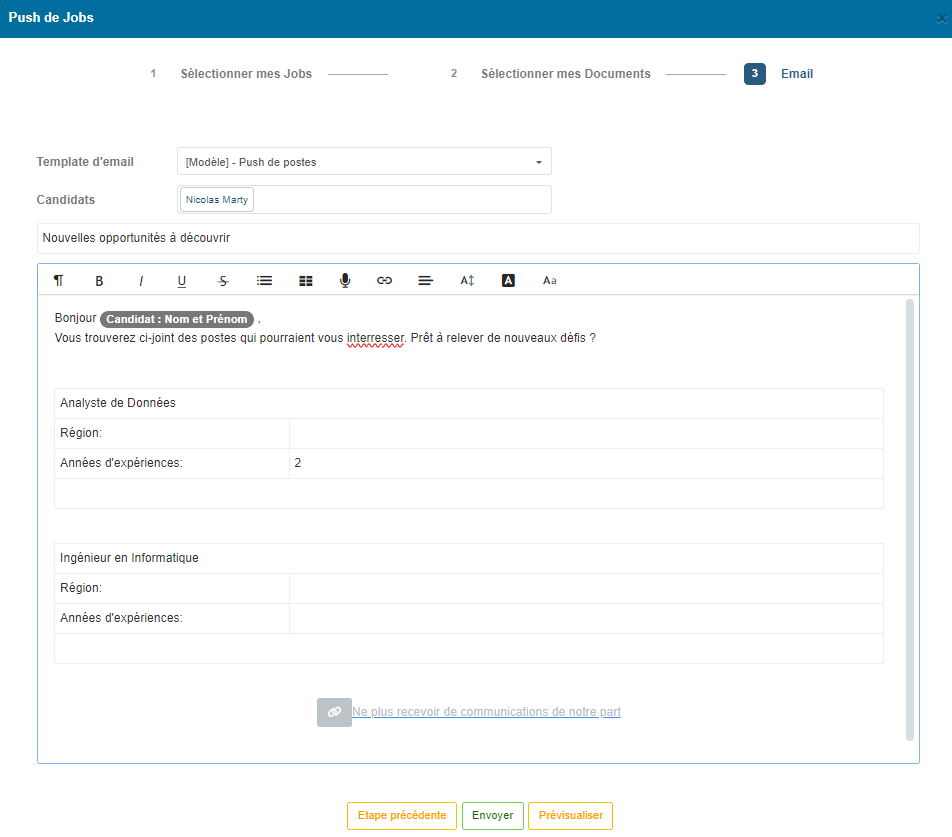
Adapt the email sent to your candidates. The Nicoka template inserts your job listing and a GDPR-compliant unsubscribe link, which we recommend keeping.

A template attached to the Candidate entity
Unsubscribe link included by default
Editable subject line
2
Push Jobs email template, Nicoka CABS

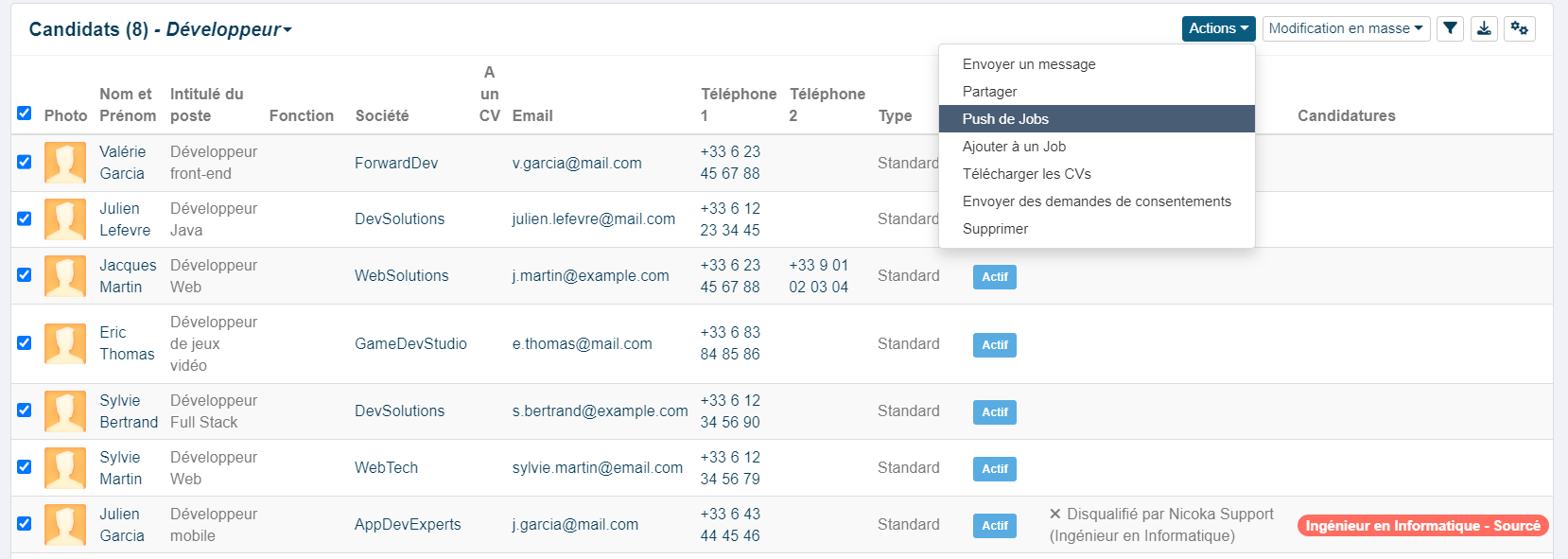
Select the candidates and the jobs to push

From the All candidates view, apply a saved view or pick the profiles by hand, then run the Push Jobs action. Next, choose the roles to put forward.

Target by saved view or select by hand
Up to 200 recipients per send
GDPR opt-outs honoured automatically
3
Selecting candidates for Push Jobs, Nicoka CABS

Send, and update the candidate records automatically

Once you have previewed it, send in one click. The action is tracked on every candidate record concerned and feeds the list of roles put to them automatically.

Automatic blind copy for confidentiality
Roles put forward updated on the candidate record
A full push history in Nicoka
4
Sending a Push Jobs, Nicoka CABS

The only software
you need.

Nicoka is built to make your life easier.

Talk to an expert
200 emails
per send: the default limit on every Push keeps your sends targeted and under control, in line with deliverability good practice and the GDPR.
Nicoka CABS setting, configurable in user preferences
Recruitment expertise

Push Candidates and Push Jobs: activating your talent pool without leaving your CRM

Push Candidates and Push Jobs are two prospecting and reactivation features built into recruitment ATS-CRM software. Push Candidates sends a selection of profiles in bulk to targeted clients or prospects, as a structured and, where appropriate, anonymised listing. Push Jobs works the other way round: it sends a list of live vacancies to dormant candidates to bring them back into play.

Both flows answer a real problem for recruitment agencies:existing talent pools go under-used. Going by what is commonly seen in the sector, a large share of the candidates entered into a CRM are never contacted again after their first interaction. Pushing makes the initial sourcing effort pay by keeping an active relationship with profiles that are already qualified.

Legally, pushing jobs means sending electronic communications for commercial purposes. The GDPR and the ePrivacy directive require the recipient's explicit consent, or a legitimate interest you can justify. Nicoka CABS builds an opt-out mechanism into every Push Jobs email and automatically excludes candidates who have declined marketing communications.

The hard part for recruiters is not seeing the point of these sends: it is running them without friction from the tool they use every day. Building a list, writing an email, attaching documents, renaming files and sending from an outside mailbox multiplies both the steps and the chances of a mistake. Nicoka CABS brings all of it together from the candidate record or the contacts view, with every action tracked automatically.

Pushing by hand or from the CRM: what actually changes

Pushing by hand, from an outside mailbox

The candidate or job list built by hand in Excel
Contact details copied and pasted from the CRM into the mailbox
No record of the send on the candidate or contact file
Every attachment renamed by hand before sending
GDPR opt-outs left to the recruiter to manage
Blind copy to be set up by hand

Nicoka CABS, built-in module

Candidate or job listing generated from the CRM automatically
Recipients selected by saved view or by hand
Send tracked on every candidate and contact record
Automatic renaming options for attachments
GDPR opt-out built in, with refusals excluded automatically
Automatic blind copy on every recipient

Frequently asked questions

What recruiters ask about Push Candidates and Push Jobs

What is the difference between Push Candidates and Push Jobs in Nicoka?

The Push Candidates sends a selection of profiles from your pool to targeted clients or prospects. It is a proactive commercial move: you put available candidates forward without waiting for a formal brief. The email carries a structured listing, and anonymised CVs can be attached.

The Push Jobs works the other way round: it targets candidates in your pool to put your live vacancies to them. The aim is to bring dormant profiles back into play and keep the relationship with your candidate community alive.

How many recipients can I target with a Push in Nicoka?

Each send is capped at 200 recipients by default. The limit follows the number of rows in a saved view and can be changed in your user preferences. Each recipient gets an individual email (one recipient = one email sent). All recipients are blind-copied automatically, so everyone's confidentiality is preserved.

How does Push Jobs comply with the GDPR?

Nicoka CABS builds two compliance mechanisms into Push Jobs. First, an unsubscribe link is included in the email template by default: we recommend keeping it, to stay within the rules. Second, candidates who have ticked « Does not wish to receive marketing emails » on their record are excluded from the send list automatically, with nothing for you to do.

Can anonymised CVs be attached to a Push Candidates?

Yes. At the document selection step you can attach one or more files to your send, including anonymised CVs generated beforehand through Nicoka's anonymisation module. Attachments are optional.

Four renaming options are available: keep the original name, add the first and last name, add the first name only, or add the candidate's unique reference. We recommend the last of these to preserve anonymity.

Are push sends tracked in Nicoka?

Yes, every send is recorded in the action history automatically. For Push Candidates, the action appears in the summary of actions taken with the candidate concerned. For Push Jobs, the send is tracked on the candidate record and feeds the list of roles put to them automatically.

How do I adapt the listing and email templates in Nicoka?

Nicoka provides ready-to-use templates for candidate listings, job listings and covering emails. To adapt them, duplicate the template provided from the settings, then add or remove fields. Your own templates are then assigned from: Modules > Recruitment > Settings > Push settings.

Can I preview the email before sending?

Yes. At the confirmation step, a « Preview » button sends a test version straight to your own mailbox so you can check how it looks. You can also go back to earlier steps at any point to correct your selection or your documents.