FR EN
Feature Recruitment

Your candidate interview
questionnaires in Nicoka

Make candidate tracking easier
from setting up the questionnaire to writing up the notes.

Built into Nicoka
Interview Assessment Test Form

Five questionnaire types, one for every stage of hiring

Build questionnaires that fit each situation, from multi-assessor interviews and phone assessments to sequential technical tests and application forms, then find the answers straight on the candidate record without leaving Nicoka CABS.

Talk to an expert
QUESTIONNAIRES Interview Multiple assessors CANDIDATE Assessment By phone CANDIDATE Test Sequential & technical CANDIDATE Five types of questionnaire CANDIDATES Sophie Martin Digital project manager INTERVIEW ✓ Thomas Rey Full stack developer TEST ✓ Laura Dubois Management accountant ASSESSMENT ✓

Five types, one per situation

Interview, Assessment, Form, Test or Application form: each type sets its own way of being filled in, matched to how you are assessing.

Part of the candidate record

Completed questionnaires sit in the candidate record's sub-menus, by type. No more juggling your CRM and an outside tool.

Free structure, in sections

Organise your questionnaire into as many sections as you need, each with an optional introduction and conclusion. Add as many questions as you like.

Versioning with no side effects

To update a questionnaire, duplicate it and test on the copy. Questionnaires already completed stay as they were: your existing answers are never overwritten.

How it works

From setting up to publishing, in four steps.

Create your questionnaire

Go to Modules > Settings > Recruitment > Settings, Questionnaire tab, and click « Create a new questionnaire ». Enter the type, the entity and the label.

Modules > Settings > Recruitment > Settings > Questionnaire
Type, entity and label are set when you create it
Type and label can be changed afterwards, the entity cannot
1
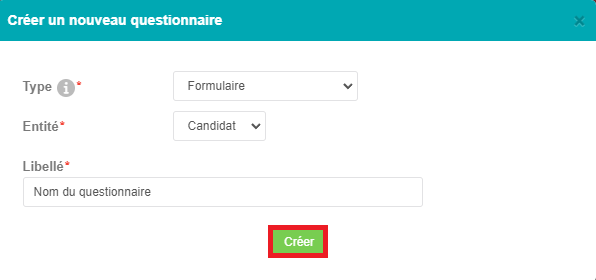
Creating a candidate questionnaire, Nicoka CABS

Choose the type that fits your situation

Nicoka offers five questionnaire types. The type sets how it is filled in: multi-assessor interview, guided assessment, a form you can email, sequential test or application form.

Interview: several assessors, the same questions for each participant
Assessment: phone or in-depth interviews, a guided process
Test: questions in sequence, answers locked once given
2
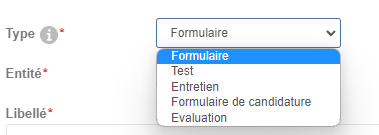
Nicoka CABS questionnaire types: Interview, Assessment, Form, Test

Structure it with sections and questions

Add one or more sections to your questionnaire (label required, introduction and conclusion optional), then enter the questions for each section. You can create as many as you need.

Sections with optional introduction and conclusion
Several question types, with configurable input hints
Questions required or optional, as you prefer
3
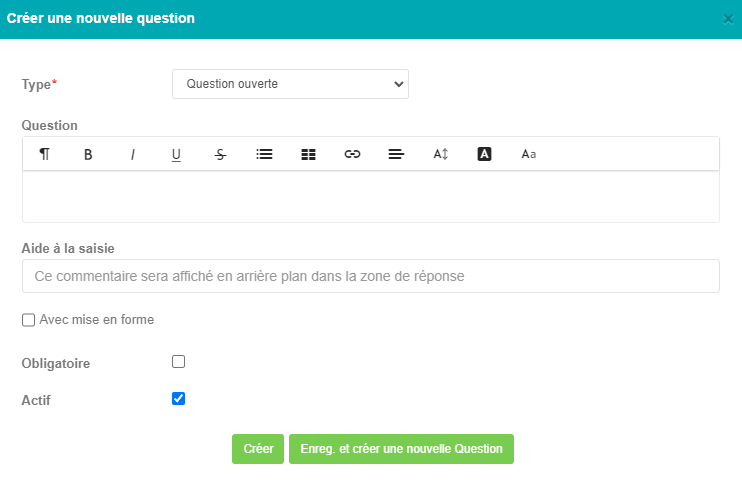
Adding questions to a Nicoka CABS questionnaire

Set who can see it, then publish

Set who can reach the questionnaire by clicking « Everyone » on the Accessible by line. To update a questionnaire already in use, duplicate it: existing answers stay as they were.

Access restricted by user profile, from the settings
Duplicating is the recommended way to update
Questionnaires already completed are locked and unaffected
4
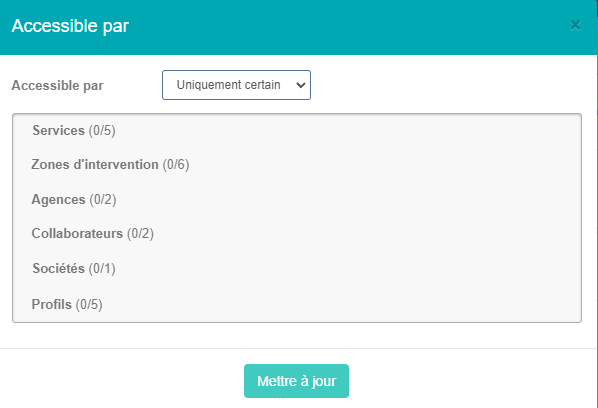
Setting who can access a questionnaire, Nicoka CABS

The only software
you need.

Nicoka is built to make your life easier.

Talk to an expert
Five types
of questionnaire available in Nicoka CABS: Interview, Assessment, Form, Test and Application form cover every candidate assessment situation.
Nicoka CABS setting: Modules > Settings > Recruitment > Questionnaire
Recruitment expertise

Candidate questionnaires in an ATS: bringing assessment into the heart of the CRM

A candidate questionnaire is a structured assessment tool, built into the hiring process, that gathers qualified information about candidates beyond the CV. In ATS-CRM software such as Nicoka CABS, these questionnaires attach directly to the candidate record or to the application process (the Job entity), so nothing scatters across outside tools.

Assessment takes many forms (multi-assessor interviews, phone interviews, sequential technical tests, application forms), and each calls for its own way of being filled in. Nicoka CABS offers five types to match: Interview (several assessors each answer the same questions), Assessment (a guided, methodical process), Form (an overview you can send by email), Test (questions in sequence, with no going back) and Application form (attached to the Job entity, to complete the candidate record as they apply).

The point for recruiters is not simply creating questionnaires: it is finding the answers in the right place at the right time , right on the candidate file, with no re-keying and no export. Nicoka CABS files completed questionnaires in the candidate record's sub-menus by type, with access configurable per user profile.

Maintaining questionnaires also follows a logic of safe versioning: Nicoka recommends duplicating an existing questionnaire before any update. Questionnaires already completed stay on the original version, while new ones use the updated version, with no effect on the answers already collected.

An outside questionnaire or one built into the CRM: what actually changes

An outside questionnaire, in a third-party tool

Built in a separate tool (Google Forms, Typeform and the like), with no link to the CRM
Answers stored away from the candidate record, hard to find again
No types matched to HR situations (interview, test, assessment and so on)
Access managed by hand, outside your settings
Updating is risky: every earlier version is affected
No trace of the send or the responses on the candidate file

Nicoka CABS, built-in module

Questionnaires created and managed in the CRM, with no third-party tool
Answers available in the candidate record's sub-menus, by type
Five distinct types, one per assessment situation
Access configurable per user profile, from the settings
Duplicating is recommended: existing questionnaires stay locked and unaffected
The Job entity is available for application forms tied to a vacancy

Frequently asked questions

What recruiters ask about candidate questionnaires in Nicoka

What is the difference between an « Interview » questionnaire and an « Assessment » questionnaire in Nicoka?

The questionnaire type Interview is built for sessions involving several participants. Each one answers the questions independently, so you can compare what several assessors made of the same candidate. It suits end-of-year reviews and panel interviews.

The questionnaire type Assessment is built for phone interviews and in-depth assessments. It walks the assessor through a detailed, methodical process so the candidate's answers are qualified in a structured way.

How do I create a candidate questionnaire in Nicoka CABS?

You create one from Modules > Settings > Recruitment > Settings, Questionnaire tab. Click « Create a new questionnaire », then enter three things: the type (Interview, Assessment, Form, Test or Application form), the entity (Candidate or Job) and the label. Once created, the type and the label can still be changed, but the entity cannot.

Can access to a questionnaire be limited to certain users?

Yes. On the questionnaire's settings page, click « Everyone » on the Accessible by line. A window opens where you can restrict access by picking exactly which profiles are allowed. You can change this at any time.

How do I structure a questionnaire into sections and questions?

In the questionnaire editor, start by clicking « Add a section ». Only the section label is required; the introduction, the conclusion, the colours and the active/inactive status are optional. Once the section exists, click « Add a question » to enter the questions for it.

For each question you set the type, the wording, an optional input hint (guidance text shown on the answer line), and whether an answer is required. You can create as many sections and questions as you want.

How do I update a questionnaire without losing the answers already given?

Nicoka recommends creating an identical second questionnaire by duplicating the original, testing your changes on that copy, then applying them to the original once you are happy. Questionnaires already completed are locked: they keep the version of the questionnaire as it stood when they were filled in. Only new ones pick up the updated version.

What is the difference between the « Candidate » entity and the « Job » entity for a questionnaire?

TheCandidate entity is used for Interview, Assessment, Form and Test questionnaires. These are reached from the various sub-menus of the Candidate record in Nicoka.

TheJob entity is reserved for Application form questionnaires. It lets you add specific questions during the application process, alongside the standard form, to gather targeted information about applicants.
